 |
Radical Pie Equation Editor |
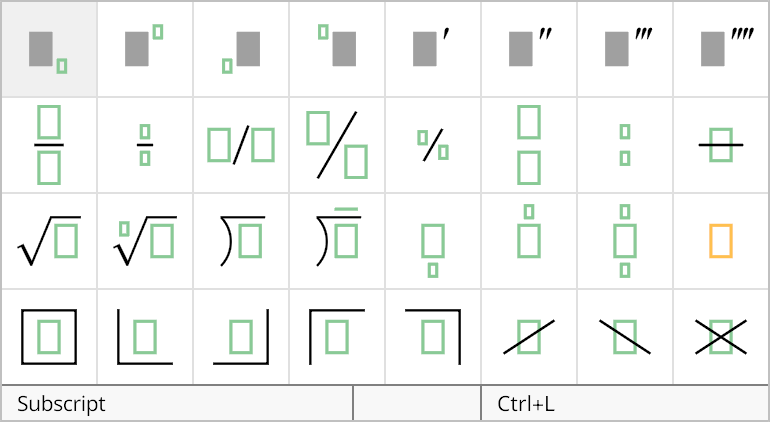
Prime symbols can be attached to a variable by selecting them from the first row of the structures palette, shown below. In MATH mode or CHEM mode, a single prime symbol can be inserted by typing Ctrl+', the control key plus the apostrophe. Multiple primes can be inserted by adding combinations of the Shift and Alt keys, as shown in the palette. Multiple primes can also be inserted by simply inserting a single prime multiple times, and the editor will automatically merge them into a single symbol containing up to four primes.
The properties of a prime structure can be changed in the Prime Properties dialog, shown below. This dialog is opened by selecting Properties... from the Edit menu or typing the shortcut Ctrl+P while the prime symbol is selected.
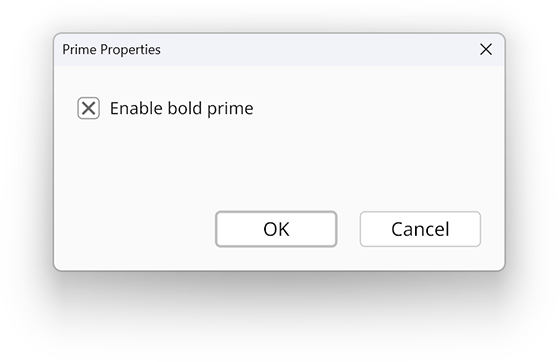
When prime symbols are attached to another symbol having the bold style, the primes themselves can be rendered in bold as well. This is controlled by the Enable bold prime box in the properties dialog. The default setting for the prime bold style can be specified in the Editor Configuration dialog.