 |
Radical Pie Equation Editor |
Radical Pie includes features for constructing basic structural diagrams for chemical compounds. These diagrams are meant to be assembled from left to right along the main baseline of an equation, but parts of more complex compounds can extend far above or below. The bonds palette contains a variety of the simplest chemical bond sites that can be inserted into an equation. As an example, consider the following diagram of an ethanol molecule.

To construct this molecule, first switch to CHEM mode by typing Ctrl+E or clicking on the mode in the lower-left corner of the editor. Then start with the hydrogen atom on the left by selecting the single right bond from the bonds palette. After typing an H in that bond’s only group, tab out and insert the bond site with up, down, and right bonds. Type C in the main group, tab to the upper group, type H, tab to the lower group, type H again, and tab out to the right. Repeat this one more time by inserting another bond site with up, down, and right bonds. Once you’ve tabbed out of the three groups belonging to this bond site, finally type OH for the alcohol group on the right.
For more complicated cases, the Insert Bond dialog, shown below, is opened by selecting it in the upper-left corner of this palette, by typing the keyboard shortcut Ctrl+Alt+E, or by selecting Insert Bond... from the Equation menu.
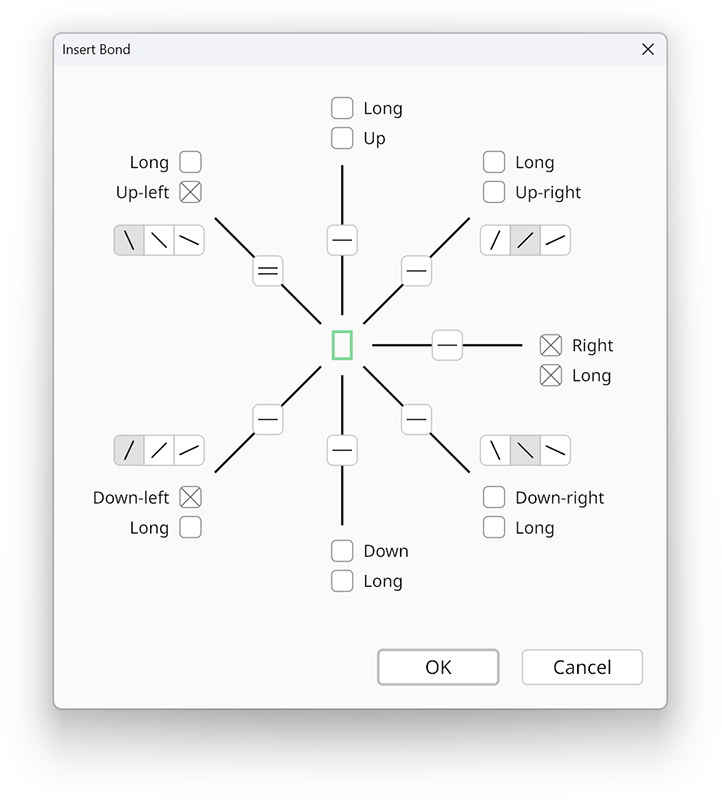
There are a total of seven different bond directions that can be enabled by checking the directional boxes at the end of each bond. By default, each bond has a short length, but you may choose to make any bond longer by checking the Long box next to the bond direction.
The four diagonal bonds each have an angle control next to them showing three separate angle options. The center angle, selected by default, is 45 degrees. The left angle is a steep angle that makes the bond more vertical, and the right angle is a shallow angle that makes the bond more horizontal. The exact measurements of the steep and shallow angles are 60 degrees and 30 degrees by default, and they can be globally modified in the Equation Design dialog.
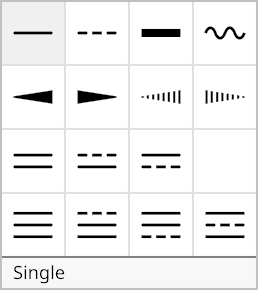
The appearance of each bond can be selected from the 15 options shown in the following palette by clicking on the icon at the center of the bond.
Once your bond has been fully configured, click the Okay button to add it to the equation. A bond site can be edited later by selecting it and typing Ctrl+P to open its properties dialog, which is the same window described on this page.
Any of the groups in a bond site can contain additional bond sites, and that is how more complex molecules are built up. When Ctrl+P is typed to edit the properties of a bond, the options pertain to the bond that owns the group containing the caret.